Best Camera For Golf Videos: Buying Guide
The SVPRO 1080P 120fps USB camera is the best camera for golf videos and swing analysis on a computer.
Trying to film a golf swing often ends with a shaky phone, a cut-off club, or footage too slow to show impact. The right camera makes a clear difference. I looked at speed, zoom, setup, portability, and value across these golf video cameras and recording stands. Some picks suit indoor simulators, while others work better on the course. My top choices focus on clear swing playback, easy framing, and simple setup for golfers, coaches, and creators.
See the differences between my top picks at a glance.
SVPRO 1080P 120fps Golf Swing Camera

The SVPRO USB camera stands out for golfers who want smooth swing playback on a computer. It records 1080P video at up to 120 frames per second, which gives you more detail during a fast takeaway and impact. Its 12MP and 4K webcam labeling also makes it useful for normal video calls and indoor content. The manual 3.6–10mm zoom range helps you frame a full swing without moving the camera.
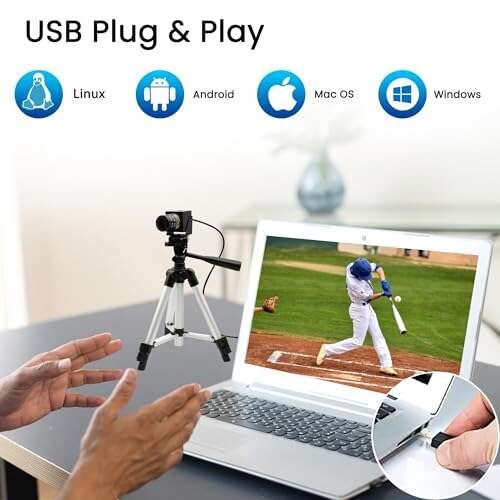
I like this model most for a home golf simulator, coaching desk, or indoor practice bay. UVC plug-and-play support should make setup simple on compatible Windows, Linux, macOS, and Android devices. Still, check your computer port, software, and lighting before buying. This is a USB camera, not a rugged outdoor action camera.
Pros:
- High-speed 1080P recording for swing review
- Manual zoom helps frame the golfer
- Useful 12MP and 4K webcam functions
- Plug-and-play UVC design
- Works with several computer systems
Cons:
- Needs a computer or compatible host device
- Manual focus and zoom need hands-on setup
- Indoor lighting affects final video quality
What Amazon Buyers Are Saying
Buyer feedback should be checked on the live Amazon page because ratings and comments can change. The product listing highlights fast frame rates, zoom control, and broad device support. As with many USB cameras, buyers should pay close attention to software compatibility, cable needs, and the difference between standard video resolution and high-speed modes.
My Recommendation
I recommend this as the strongest all-around pick for computer-based golf swing analysis. It offers the right mix of speed, zoom, and simple connection. It is worth buying if your goal is clear indoor swing footage rather than walk-and-talk course video.
Golf Tripod and Monopod Magnetic Phone Stand
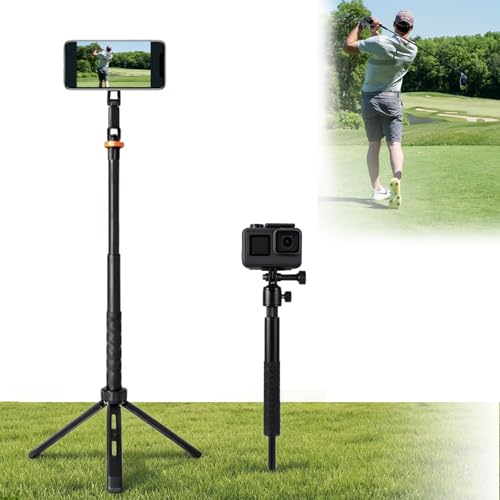
This product is a recording stand rather than a camera. It gives golfers a simple way to use the phone they already own. The magnetic design can make quick setup easier for compatible phones and cases. A phone stand also keeps your hands free while you practice or record a lesson.
Your phone controls the final image quality, frame rate, and stabilization. That makes this a flexible choice for golfers who do not need a dedicated webcam. Before using it near a green, test the grip, phone fit, and viewing angle. A stable stand can matter as much as the camera when you film alone.
Pros:
- Uses an existing smartphone
- Fast setup for solo practice
- Magnetic design can reduce mounting time
- Useful for swing clips and coaching calls
- Lightweight concept for course use
Cons:
- Phone compatibility must be checked
- Video quality depends on the phone
- Wind or uneven ground may affect stability
What Amazon Buyers Are Saying
Check current Amazon reviews for comments about magnetic strength, phone fit, and stand stability. These details can vary with phone model and case thickness. The listing presents this as a golf recording aid, so buyers should not expect it to improve image quality beyond what their phone already provides.
My Recommendation
This is a sensible add-on for golfers who already own a good phone. I would choose it for quick practice videos and course content, but not as a replacement for a high-speed USB golf camera.
IFWATER 1080P 260fps USB Golf Camera
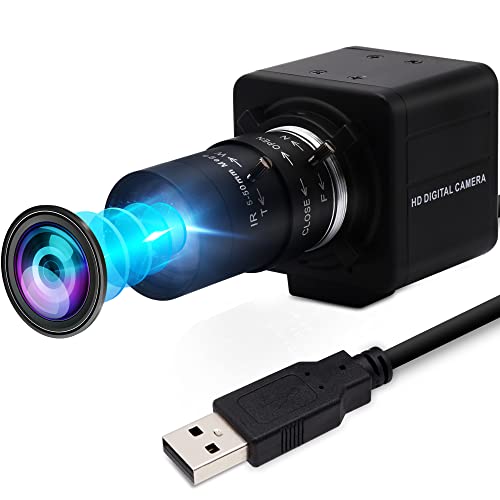
The IFWATER 1080P camera targets golfers who want very slow swing playback. Its listed 260fps high-speed mode can help break down quick movements when the computer and software support that mode. The 5–50mm lens range gives you much more framing control than a fixed webcam. Its 10X optical zoom listing also suits users who need a close view from a longer distance.
This camera makes the most sense in a fixed indoor practice space. Manual controls take more time, but they can help you set a repeatable view for face-on and down-the-line swings. Resolution, frame rate, and lighting may vary by selected mode, so read the current technical details before purchase. It also lists support for Windows, Mac, and Raspberry Pi systems.
Pros:
- Very high listed frame rate
- Wide 5–50mm manual lens range
- 10X optical zoom listed
- Good fit for detailed swing study
- Supports several computer platforms
Cons:
- Manual controls need careful setup
- High-speed modes may need compatible software
- Less convenient for outdoor handheld filming
What Amazon Buyers Are Saying
Review the current Amazon comments for reports on frame-rate use, software setup, and focus control. The listing emphasizes speed and optical zoom, but buyers should confirm how those features work with their chosen computer. USB cameras also depend on the host device for power and video handling.
My Recommendation
Choose this if slow-motion swing analysis matters more than simple setup. It is a specialist option and may be more camera than a casual golfer needs. For serious indoor practice, its listed speed and zoom are compelling.
kimire Full HD 1080P Camcorder
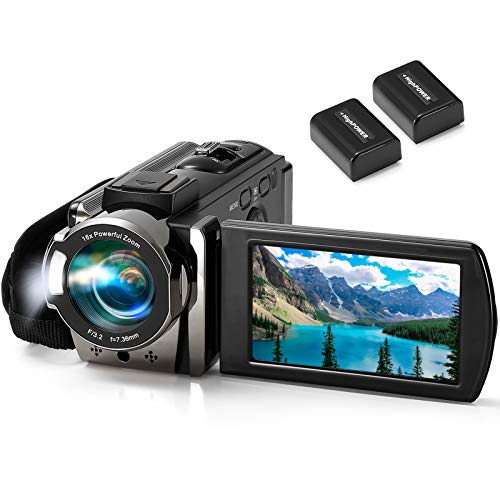
The kimire camcorder is a basic handheld option for golfers who want a dedicated recording device. It lists Full HD 1080P video, a 24MP still-image rating, and a 3-inch 270-degree rotating LCD. The screen can help you check framing from unusual angles. Its two-battery setup may also help during longer recording sessions.
The listed 16X digital zoom can bring a distant golfer closer on screen, but digital zoom may reduce detail as you increase it. This camcorder suits simple swing clips, family golf videos, and beginner content. It does not offer the high-speed capture focus of the specialist USB cameras above. I would use a tripod for the clearest swing footage.
Pros:
- Dedicated camcorder design
- Full HD video output
- Rotating LCD helps with framing
- Includes two batteries according to the listing
- Simple choice for casual recording
Cons:
- Listed video rate is 15fps
- Digital zoom can soften distant subjects
- Not ideal for detailed impact analysis
What Amazon Buyers Are Saying
Check current buyer reviews for battery life, screen use, image quality, and ease of operation. The listed features suggest a beginner-friendly camcorder, but the 15fps specification is important for golfers. It may not show a fast club movement as smoothly as a 120fps or 260fps camera.
My Recommendation
This is a low-cost choice for basic golf videos, not my first choice for swing coaching. Buy it if you want a simple handheld camcorder and do not need slow motion. For technical analysis, spend more on a high-speed model.
Ground Golf Monopod Phone Stand
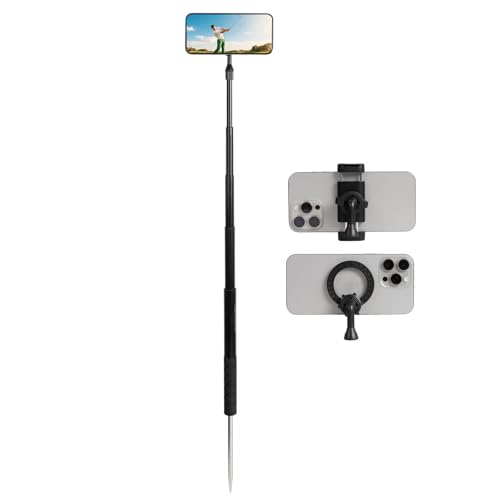
This ground golf monopod uses a spike stake and extends to 46 inches, according to the product listing. That design can help place a phone at a useful height for a full swing. The universal 1/4-inch screw adds flexibility for compatible phone holders, cameras, or accessories. It also lists support for MagSafe and other smartphones.
I see this as a practical course tool for golfers who record alone. The spike may hold better than a flat stand on suitable ground, but you should use care around delicate turf. Phone balance, case fit, and wind still matter. Since the stand does not create video, your phone remains the key factor in image quality.
Pros:
- 46-inch listed extension
- Ground spike can improve placement
- Works with many smartphone setups
- Useful universal 1/4-inch screw
- Good for solo swing recording
Cons:
- Not suitable for every surface
- Phone camera quality controls the result
- Spike use needs care on maintained turf
What Amazon Buyers Are Saying
Look at current Amazon feedback for spike strength, height, phone stability, and compatibility. These points can differ based on soil and device weight. The product is best judged as a mounting aid, not as a camera with its own image sensor.
My Recommendation
I recommend this for golfers who already have a capable phone and need a hands-free outdoor mount. It offers more useful course placement than a pocket tripod, but it cannot match a dedicated high-speed USB camera.
4K 80MP Camcorder With 18X Zoom
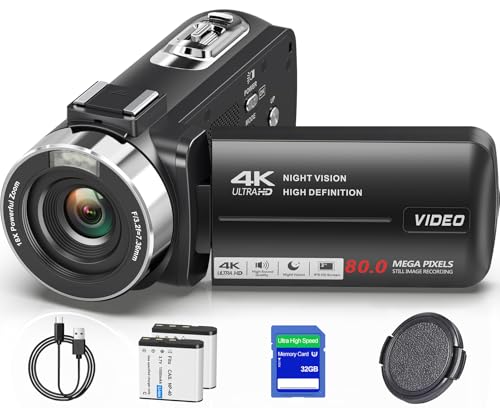
This camcorder is aimed at creators who want a 4K video device for golf, vlogs, and YouTube. Its product title lists an 80MP still-image figure and 18X zoom. A handheld camcorder can feel more natural than a webcam when you move around the course. It may also suit golfers who want one device for practice clips and general content.
Do not confuse a high still-photo number with smooth swing capture. For fast golf action, frame rate, shutter speed, and light matter more than a large megapixel label. The listed zoom can help with distant subjects, but stability becomes more important at long reach. A tripod or monopod will improve results when you film from behind the golfer.
Pros:
- 4K video listed for creator work
- Useful handheld camcorder shape
- 18X zoom listed
- Good for golf and general vlogging
- Can cover wide and distant shots
Cons:
- Fast-action frame rate needs confirmation
- Long zoom needs steady support
- Large still-image claims do not ensure better video
What Amazon Buyers Are Saying
Check current Amazon reviews for actual 4K output, zoom behavior, battery use, and low-light results. Buyers should also confirm whether the desired frame rate is available in 4K or only at lower resolution. Those details matter when choosing a camera for golf videos.
My Recommendation
This is a better fit for golf creators than for strict swing analysis. I would consider it when 4K course content and zoom matter most. For slow-motion coaching, choose a camera with a clearly stated high-speed mode.
Golf Swing Analyzer Phone Tripod

This golf tripod is built around a familiar idea: use your smartphone as the camera and give it a stable place to sit. It is made for swing recording, training, and phone-based analysis. A tripod can keep the lens at the same height from one swing to the next. That consistency helps when you compare setup, takeaway, and finish.
The main benefit comes from repeatable placement, not extra camera power. Make sure the holder fits your phone and case. You should also place it far enough away to capture the full club and body. If you use a phone with a high frame-rate mode, this stand can become a low-cost golf video system.
Pros:
- Designed for golf swing recording
- Supports repeatable camera placement
- Uses a phone many golfers already own
- Useful for training and self-review
- Simple alternative to a dedicated camera
Cons:
- Does not include a camera sensor
- Phone fit must be checked
- Tripod placement may take trial and error
What Amazon Buyers Are Saying
Read the current Amazon reviews for holder grip, leg stability, height, and ease of adjustment. Those are the key real-world points for any phone tripod. The listing supports smartphone and camera use, but your device size and mount style still decide compatibility.
My Recommendation
This is one of the best value choices for golfers who already own a modern phone. It is not the best camera for golf videos by itself, but it can be the best support tool for a phone-based setup.
@iRangeSports MagSafe Golf Monopod
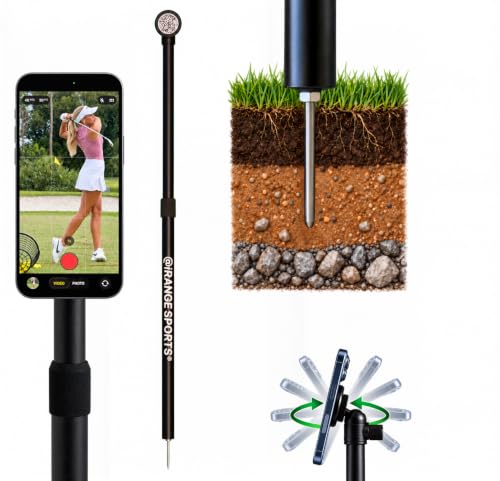
The @iRangeSports Stick EXT is a portable monopod made for steady phone and tablet video. Its MagSafe-compatible puck can make phone attachment quick for compatible devices. The listing also describes it as useful for golf, sports, vlogs, and home creators. That broad use makes it more flexible than a golf-only stand.
MagSafe convenience depends on the phone, case, and magnetic setup you use. I would test the connection before filming a full round or placing the phone near a moving club. The stand is a useful choice for golfers who want a compact tool for both practice and content. It still relies on the phone for image quality and frame rate.
Pros:
- Portable design for travel
- MagSafe-compatible setup
- Works for golf and other video tasks
- Can support phone or tablet use as listed
- Useful for creators and coaches
Cons:
- Magnetic fit depends on the device
- Phone image quality varies by model
- Long devices may need extra care for balance
What Amazon Buyers Are Saying
Check current buyer reviews for magnetic hold, extension strength, portability, and tablet support. These points matter more than a camera specification because this product is a stand. Buyers should confirm their phone case does not block the magnetic connection.
My Recommendation
I recommend it for MagSafe users who want a compact recording stand. It offers good flexibility, but golfers without a compatible phone may prefer a universal clamp or tripod.
IFWATER 4K 120fps USB Golf Camera

This IFWATER model combines a listed 12MP sensor rating with 4K USB webcam output and 1080P recording at up to 120fps. That gives it two useful roles. You can use higher resolution for normal video, then switch to a faster mode for swing playback. The 3X manual optical zoom helps you adjust the frame without relying only on digital enlargement.
It is a strong option for golfers who want a computer camera for practice and streaming. Manual zoom gives more control, but you should set the view before the session. The camera needs a suitable USB host and compatible software. As always, confirm the exact resolution and frame-rate combinations before you buy.
Pros:
- 4K and 1080P 120fps modes listed
- 12MP specification
- 3X manual optical zoom
- Useful for golf and live streaming
- Plug-and-play computer design
Cons:
- Manual framing takes extra time
- USB setup limits outdoor use
- Software support can affect performance
What Amazon Buyers Are Saying
Use the live Amazon page to review comments about sharpness, frame-rate modes, zoom control, and computer compatibility. The product listing supports several uses, including golf swing video and streaming. Actual results still depend on lighting, software, and the computer connected to the camera.
My Recommendation
This is a close alternative to the top SVPRO model. I would choose it when 4K webcam use and 3X optical zoom fit your setup. It is a very good pick for indoor golf video and coaching.
SVPRO 4K 120fps Golf Simulator Camera

This SVPRO model is built for golfers who want a USB camera near a simulator or indoor hitting area. It lists 12MP and 4K webcam capability, plus 1080P video at 120fps. The 3X manual zoom helps users set a useful frame for the golfer and club. It also lists compatibility with Windows, Linux, macOS, and Android.
The shorter zoom range makes this model simpler than the SVPRO camera with a 3.6–10mm lens. That can be an advantage when you want fewer adjustments. It remains a fixed-location camera, so it is not the right tool for walking the fairway. For indoor golf, however, the mix of speed, resolution, and UVC plug-and-play support is appealing.
Pros:
- 1080P at 120fps listed
- 4K and 12MP webcam functions
- 3X manual zoom
- Good match for golf simulators
- Broad operating-system support listed
Cons:
- Designed mainly for fixed setups
- Manual zoom requires initial adjustment
- Needs a compatible USB connection
What Amazon Buyers Are Saying
Check current reviews for simulator setup, focus, software support, and high-speed video. The listing gives useful feature details, but your simulator software may have its own camera limits. Confirm that your computer can process the selected video mode.
My Recommendation
I recommend this for golfers building a clean indoor simulator setup. It is one of the best camera for golf videos choices when you want high-speed recording without a complex camera system.
How to Choose the Best Camera for Golf Videos
Choosing the best camera for golf videos depends on how you record. A coach needs clear slow motion. A course creator may need 4K, zoom, and easy handheld use. A casual golfer may get better value from a phone stand. Use these three checks before you buy.
1. Match the frame rate to your swing goal
Frame rate tells you how many video frames the camera captures each second. A 120fps mode can show more stages of a fast swing than basic 15fps video. A 260fps listing may offer even more slow-motion detail, but your computer and software must support it. Do not buy based on “4K” alone. For golf swing analysis, speed often matters more than maximum resolution.
2. Choose the right lens and recording setup
Manual zoom helps you fill the frame without moving the camera. Optical zoom usually keeps more detail than digital zoom. A USB webcam works well beside a simulator or laptop. A camcorder works better when you walk around the course. A phone stand may be the best choice if your phone already records sharp, high-frame-rate video. Always check the full club fits in the frame.
3. Check compatibility, light, and support
Confirm the camera works with your computer, operating system, and golf software. USB models need a suitable port and enough power. Good light helps every camera focus and show club movement. Use a tripod or monopod for repeatable angles. Before filming a full session, test face-on and down-the-line views. This simple step prevents cut-off swings and wasted practice time.
Final Verdict: Which Should You Buy?
For most indoor golfers, I recommend the SVPRO 1080P 120fps USB camera. The IFWATER 260fps model suits advanced slow-motion study, while the SVPRO 4K 120fps model is excellent for simulators.
The best camera for golf videos should match your space, device, and swing goals. Choose speed for analysis, 4K for creator work, or a stable phone stand for simple course clips.
FAQs Of best camera for golf videos
What is the best camera for recording a golf swing?
The SVPRO 1080P 120fps USB camera is my top overall pick. It combines high-speed video, manual zoom, and simple computer use.
Is 120fps enough for golf swing analysis?
Yes, 120fps can provide smooth slow-motion review for many golfers. A 260fps camera may show even more detail if your software supports it.
Is a phone good for recording golf videos?
Yes. A modern phone can record excellent golf video. Add a stable tripod or monopod, and check that the full swing fits in the frame.
Should I choose 4K or high frame rate for golf?
Choose high frame rate for swing analysis. Choose 4K when you mainly want sharp course footage, vlogs, or YouTube content.
Do USB golf cameras work with every computer?
No. Check the listed operating-system support, USB port, software needs, and computer performance before buying.

Brandon Knoxley is a sport & fitness writer and training guide contributor at MySportFitHub. He focuses on practical workouts, performance-based training, and honest fitness gear insights designed for real people and real results. Brandon is passionate about helping beginners and active individuals train smarter, avoid common mistakes, and build sustainable fitness habits.