
How To Reset Horizon Treadmill Lube Belt: Easy Guide
Most Horizon treadmills reset the lube-belt reminder by holding Stop and Speed Up after proper lubrication.
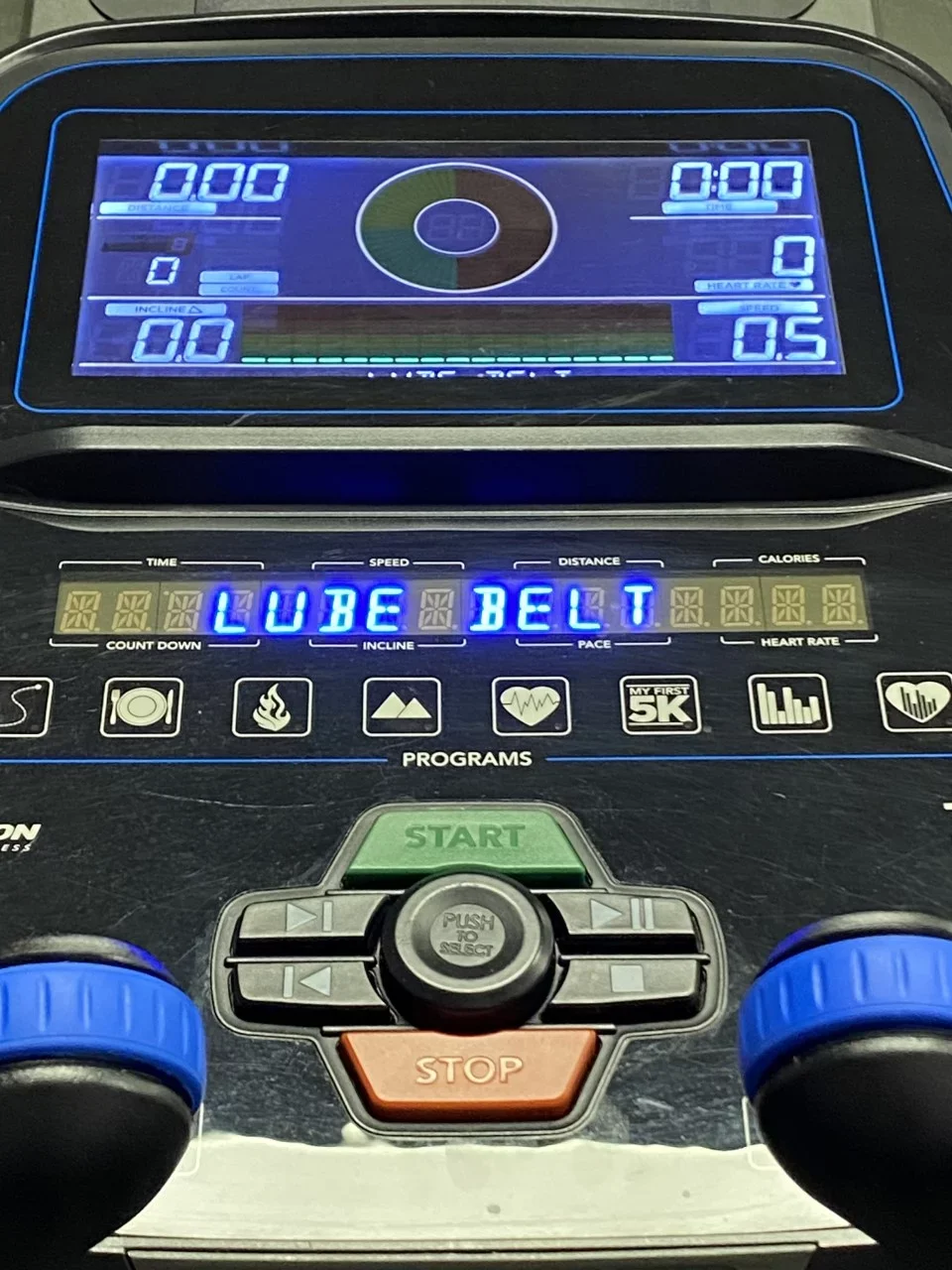
If your Horizon treadmill still shows a “LUBE BELT” message, the belt may not be the problem. The alert is often a maintenance timer, and the reset process clears that reminder after you apply the correct silicone lubricant. This guide explains how to reset Horizon treadmill lube belt reminders safely, how to tell when lubrication is needed, and what to do if the message will not disappear.
What the Horizon lube-belt reminder means
The lube-belt message is a maintenance reminder. It does not always mean the belt is damaged or completely dry. Most Horizon treadmills use a timer or distance counter to remind you to check the walking belt and deck.
A treadmill belt moves over a smooth board called the running deck. Silicone lubricant reduces friction between these two parts. When friction rises, the motor must work harder, heat can build up, and the belt may feel slow or uneven.
Before you reset the reminder, check these signs:
• The belt feels jerky or sticky during use.
• The treadmill makes a rubbing or squealing sound.
• The motor sounds strained.
• The belt deck feels dry when checked according to the owner’s manual.
• The machine displays “LUBE BELT” or a similar maintenance alert.
Resetting the message without adding lubricant only hides the reminder. Think of it like turning off a car’s oil light without checking the oil. The display may go away, but the cause remains.
What you need before resetting the belt reminder
You do not need many tools for this task. The most important item is treadmill-grade 100% silicone lubricant. Many Horizon models require liquid silicone, while some products come with a small applicator tube.
Avoid using household oils or sprays. Products such as WD-40, cooking oil, motor oil, and multipurpose grease can damage the belt, soften materials, attract dust, or create excess drag.
Prepare these items:
• Horizon-approved or treadmill-specific silicone lubricant.
• A clean, dry cloth.
• A flashlight for checking the deck.
• The treadmill owner’s manual.
• A vacuum cleaner for nearby dust, if needed.
Wear shoes with good grip when testing the treadmill. Keep children and pets away while the motor is running. Never reach under a moving belt.

How to lubricate a Horizon treadmill belt
Lubrication should come before the reset. The exact method can vary by Horizon model, so use the manual when it gives different instructions.
1. Turn off and unplug the treadmill
Press the Stop button. Move the power switch to the off position, then unplug the power cord from the wall. Wait a few minutes so the machine is fully inactive.
This step protects you from accidental belt movement. It also gives the motor control board time to power down.
2. Lift the walking belt
Stand beside the treadmill. Carefully lift one side of the walking belt near the center of the deck. You do not need to pull the belt far upward. A small gap is enough to place lubricant under it.
If the belt feels extremely tight, do not force it. A tight belt may need adjustment before lubrication.
3. Apply silicone to the deck
Place a thin line of treadmill silicone under the belt, near the center of the deck. Repeat on the other side. Follow the lubricant label for the amount.
More lubricant is not better. Too much can spread onto the belt edges, rollers, or floor. It may also cause slipping when you first use the treadmill.
4. Spread the lubricant
Plug the treadmill back in. Set the speed to a slow walking pace, often around 1 to 2 miles per hour. Let the belt run for a few minutes while you watch from the side.
Do not stand on the belt during the first test. The moving belt will spread the silicone across the deck. Stop the treadmill if you see liquid moving toward the side rails.
5. Wipe away excess lubricant
Turn the treadmill off and unplug it again. Wipe the side rails and visible belt edges with a clean cloth.
A small amount of silicone under the belt is useful. Silicone on your shoes or the top of the walking belt is a slip hazard.

How to reset Horizon treadmill lube belt reminders
Many Horizon treadmill models use the same basic button combination, but the exact process depends on the console. The most common reset method is below.
-
Turn on the treadmill without starting the walking belt.
-
Make sure the safety key is correctly inserted.
-
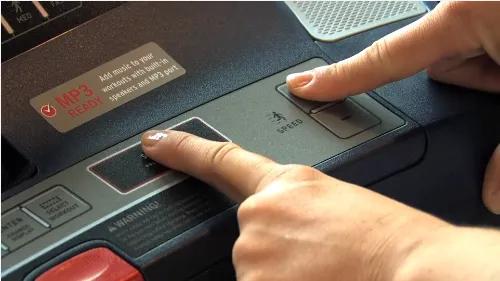
Press and hold the Stop button.
-
While holding Stop, press and hold the Speed Up or Speed + button.
-
Keep both buttons held for about five seconds.
-
Release the buttons when the lube message clears or the console beeps.
-
Turn the treadmill off, wait several seconds, and turn it on again.
This is the usual way to reset Horizon treadmill lube belt reminders on many home models. Some consoles use a different combination, such as Stop with another speed key. If this method does not work, check the model-specific manual instead of repeatedly pressing random buttons.
The model number is usually found on a sticker near the front frame, power cord, or motor cover. Write down the full model name before looking for instructions. A Horizon T101 may use a different console procedure from a 7.0 AT or Studio Series model.

What to do if the reset does not work
If the lube message remains, first repeat the process slowly. The console may require the treadmill to be powered on but stopped. On some models, the safety key must be installed, while others may require a service or maintenance mode.
Try these checks:
• Confirm that you held Stop and Speed Up at the same time.
• Hold the buttons for a full five to ten seconds.
• Make sure the treadmill is not running.
• Remove and reinstall the safety key.
• Turn the power off, unplug it for one minute, and try again.
• Check the owner’s manual for the exact button sequence.
• Look for a separate maintenance or reset menu on the console.
Do not open the motor cover just to clear the reminder. The control board contains electrical parts, and opening the cover can create a shock risk or affect your warranty.
If the treadmill still shows the message after the correct procedure, contact Horizon Fitness support or a qualified treadmill technician. The issue may involve a console error, a control board fault, or a model-specific service mode.

Common mistakes when resetting a Horizon treadmill
Knowing how to reset Horizon treadmill lube belt reminders is simple, but several mistakes can cause new problems.
Resetting before lubrication
The most common mistake is clearing the message without treating the deck. The timer may be reset, but the belt can still have high friction. Always inspect and lubricate first when the service interval is due.
Using the wrong lubricant
Household sprays and grease are not suitable for treadmill decks. Use only the lubricant listed by Horizon or a product clearly made for treadmill belts.
Applying too much silicone
Excess lubricant can make the belt slide, collect dust, and reach the rollers. Start with a small amount. You can apply more later if the manufacturer’s instructions call for it.
Tightening the belt too much
Some users tighten the walking belt when it feels slow. This can increase friction instead of fixing it. The belt should be centered and firm, but it should not be stretched like a guitar string.
Ignoring belt alignment
A belt that drifts left or right may need rear roller adjustment. Lubricant will not correct poor alignment. Make small, equal adjustments and test the treadmill after each change.
Running at high speed right away
After lubrication, test at a slow speed first. This lets you check for slipping, noise, or uneven movement before putting full weight and speed on the belt.

How often should a Horizon treadmill belt be lubricated?
The correct interval depends on the model, use, user weight, room conditions, and belt design. Many home treadmills need a lubrication check every three months or after a set number of hours, but the owner’s manual is the best guide.
A treadmill used by one person for light walking may need less service than a machine used daily for running. Dusty rooms, pets, and heavy use can increase the need for cleaning and inspection.
Use a simple maintenance plan:
• Check the belt and deck once a month.
• Clean dust near the motor and frame.
• Lubricate at the interval listed by Horizon.
• Check alignment whenever the belt drifts.
• Reset the reminder after completing the service.
In treadmill service work, one lesson comes up often: the calendar is only a guide. Belt feel, noise, and friction also matter. A reminder should start an inspection, not replace one.
Signs that lubrication is not the real problem
Sometimes the lube reminder appears at the same time as another fault. If lubrication and resetting do not improve the treadmill, look for these warning signs:
• The belt slips when you walk or run.
• The belt stops when a user steps on it.
• The motor makes a clicking or grinding noise.
• The treadmill shows an error code.
• The walking belt is cracked, frayed, or stretched.
• The deck has deep wear marks.
• The belt speed changes without pressing a button.
A slipping belt may need tension adjustment. A belt that stops under load may point to a worn belt, deck, drive motor, or motor control board. Grinding sounds may come from rollers or bearings.
Stop using the treadmill if you smell burning, see smoke, feel electrical tingling, or hear loud mechanical noises. A reset cannot repair a worn part, and continued use may make the repair more costly.

A practical example of the reset process
Imagine that your Horizon treadmill displays “LUBE BELT” after several months of regular use. The belt feels slightly sticky, but it still runs smoothly.
First, unplug the treadmill and apply the correct silicone lubricant under both sides of the belt. Then run the treadmill slowly for a few minutes to spread the lubricant. After wiping away excess silicone, turn the treadmill on without starting the belt.
Next, hold Stop and Speed Up for about five seconds. If the display clears, turn the treadmill off and restart it. Walk for a few minutes at low speed, then listen for unusual noise and check that the belt stays centered.
This example shows why the reset is the final step. The button combination clears the reminder, but the lubrication protects the belt, deck, and motor.

Safety tips for Horizon treadmill maintenance
Treadmills combine moving parts, electricity, and a heavy walking surface. Work slowly and keep safety ahead of convenience.
• Unplug the treadmill before lifting the belt or cleaning near the motor.
• Never place your hands under a moving belt.
• Keep lubricant away from the top walking surface.
• Do not use a treadmill with a damaged power cord.
• Keep the safety key attached during normal operation.
• Test repairs at low speed before walking on the belt.
• Stop using the treadmill if the belt slips badly or the motor overheats.
• Use the correct replacement parts for your model.
A clean work area also matters. Small screws, tools, and loose cloths can get pulled beneath the belt or into the motor area.
Frequently asked questions about how to reset Horizon treadmill lube belt
How do I reset the lube belt message on a Horizon treadmill?
On many Horizon models, turn the treadmill on without starting the belt, then hold Stop and Speed Up together for about five seconds. Because button settings vary, confirm the procedure in your model’s owner’s manual.
Do I need to lubricate the treadmill before resetting the message?
Yes. The reminder is meant to prompt maintenance, so lubricate the belt and deck before clearing it. Resetting the message alone does not reduce friction or protect the motor.
What lubricant should I use on a Horizon treadmill belt?
Use 100% silicone treadmill lubricant approved for walking belts and decks. Avoid WD-40, household oil, grease, and cooking oil because they can damage materials or create unsafe belt movement.
Why will my Horizon treadmill lube message not clear?
The treadmill may require a different button combination, a safety key, or a specific maintenance mode. Check the model number and manual, then contact Horizon support if the correct procedure still fails.
Can I use the treadmill immediately after lubrication?
Run it at a slow speed for a few minutes first, without standing on the belt. Check for slipping and wipe away any silicone that reaches the belt edges before normal use.
How often should I reset the Horizon lube belt reminder?
Reset it after each completed lubrication service, not on a fixed schedule alone. The service interval depends on the model and how often you use the treadmill.
Conclusion
Learning how to reset Horizon treadmill lube belt reminders is only one part of proper maintenance. First inspect the belt and deck, apply the correct silicone lubricant, spread it at low speed, and then use the common Stop and Speed Up reset sequence if your model supports it.
If the reminder stays on, do not force the console or ignore unusual sounds. Check the model manual and seek qualified help when the belt slips, the motor struggles, or an error code appears. Give your treadmill a careful inspection today, and share your model number or experience in the comments for more maintenance guidance.

Brandon Knoxley is a sport & fitness writer and training guide contributor at MySportFitHub. He focuses on practical workouts, performance-based training, and honest fitness gear insights designed for real people and real results. Brandon is passionate about helping beginners and active individuals train smarter, avoid common mistakes, and build sustainable fitness habits.