What’s More Accurate The Treadmill Or Apple Watch: Truth
For distance and speed, a well-calibrated treadmill is usually more accurate than an Apple Watch during indoor runs.
The answer to what’s more accurate, the treadmill or Apple Watch, depends on what you measure. A treadmill estimates belt movement, while an Apple Watch estimates distance from wrist motion, stride data, and GPS outdoors. After comparing how both tools behave in real workouts, the clearest advice is simple: use the treadmill for controlled indoor pace and the Apple Watch for heart rate, training records, and outdoor activity. The details below will help you understand where each device shines and how to improve both readings.

What’s more accurate, the treadmill or Apple Watch?
For indoor speed and distance, the treadmill often has the advantage because it directly controls the belt. If the display says you are running at 6.0 miles per hour, the motor is set to move the belt at that speed. This gives the treadmill a clear edge over a watch that must estimate movement from your wrist.
However, not every treadmill is accurate. Older gym machines may have worn belts, poor calibration, or speed settings that do not match the actual belt speed. If you hold the side rails, lean back, or change your stride, your workout may also feel different from the pace shown on the screen.
An Apple Watch is more useful for:
• Heart-rate tracking
• Workout duration
• Outdoor distance with GPS
• Pace changes during a run
• Training load and activity trends
• A personal record of your workouts
So, what’s more accurate, the treadmill or Apple Watch, when measuring distance? A properly maintained treadmill usually wins indoors. For heart rate, the Apple Watch may offer a more useful estimate than the treadmill’s hand sensors, especially during steady exercise.

How a treadmill measures speed and distance
A treadmill measures distance by tracking how far its belt moves. The machine uses its motor speed and belt movement to estimate the distance shown on the console. This method does not need GPS or body movement.
That sounds perfect, but a treadmill is not automatically precise. Belt tension, motor wear, incline, and poor maintenance can affect its reading. A treadmill in a busy gym may also show a small difference from a newer machine at home.
The treadmill display may be less reliable when:
• The belt slips during use
• The machine has not been serviced
• The speed sensor is worn
• You hold the rails
• The console rounds numbers
• The treadmill is set at an incline
The incline itself does not always change the distance shown. It does change the effort needed to cover that distance. Running one mile at a 5% incline is much harder than running one mile on a flat belt, even though the distance is the same.
When asking what’s more accurate, the treadmill or Apple Watch, think of the treadmill as a ruler attached to the belt. It measures the machine’s movement well, but it does not know whether your body is moving naturally.

How Apple Watch measures distance and pace
An Apple Watch uses several systems to estimate your workout. During an outdoor run, GPS is the main tool for distance and route tracking. The watch also uses its accelerometer, gyroscope, stride information, and location data to improve the estimate.
During an indoor treadmill workout, GPS is usually not useful. The watch instead studies your wrist motion and applies your past stride data. This is why Apple Watch calibration matters so much for treadmill workouts.
Your watch may be less accurate when:
• You hold the treadmill rails
• Your arms do not swing normally
• You push a stroller or carry weights
• Your stride changes often
• You run while gripping your phone
• The watch fits loosely
• You have not completed outdoor calibration
The Apple Watch does not measure the belt. It guesses how far your body has traveled from movement patterns. That guess can be very good for some runners, but it can drift when your form changes.
This explains why what’s more accurate, the treadmill or Apple Watch, is not the same for every person. A runner with a consistent stride may see close results, while a walker who holds the rails may see a large gap.

Apple Watch accuracy on a treadmill
Apple Watch treadmill accuracy can improve after calibration. Apple recommends using outdoor workouts in an open area with good GPS reception. A steady walk or run for about 20 minutes helps the watch learn your stride and movement pattern.
To improve your Apple Watch treadmill readings:
-
Make sure your height, weight, age, and sex are correct in the Health app.
-
Wear the watch snugly above your wrist bone.
-
Turn on Motion Calibration & Distance.
-
Choose an open outdoor area with a clear view of the sky.
-
Walk or run at a natural pace for at least 20 minutes.
-
Repeat the process at different speeds if you often switch between walking and running.
Calibration does not make the watch perfect. It helps the watch build a better personal model of your stride. If you use a different stride on the treadmill, the distance may still differ from the machine.
A common mistake is to compare the watch and treadmill after holding the rails. The treadmill counts belt movement, but the Apple Watch sees less arm motion. In that case, neither number tells the full story about your effort.

What’s more accurate, the treadmill or Apple Watch for calories?
Neither device can measure calories perfectly. Both provide an estimate based on factors such as body size, speed, duration, heart rate, and movement.
The treadmill may use speed, incline, time, and a basic body-weight setting. Some machines add hand-grip heart-rate data, but those sensors can be inconsistent. If you do not enter your weight, the calorie number may be based on a generic user.
The Apple Watch can use your recorded body details and wrist-based heart rate. This may produce a more personalized estimate, but it is still not a direct measurement of energy use. Consumer wearables often show meaningful errors when estimating calories, especially during activities with unusual movement patterns.
For calorie tracking, focus on trends rather than exact totals. If the watch says 400 calories and the treadmill says 470, that does not mean one device is lying. It means both are using different models to estimate a number that is hard to measure outside a laboratory.
So, what’s more accurate, the treadmill or Apple Watch, for calories burned? Neither should be treated as a precise calorie counter. Use the number as a rough guide, not permission to eat back every calorie shown.

What’s more accurate for heart rate?
The Apple Watch is generally more useful for heart-rate tracking than treadmill hand sensors. Its optical sensor reads blood flow at the wrist throughout the workout. Treadmill handles only measure your pulse when you hold them correctly and keep your hands still.
The Apple Watch may struggle during:
• Very intense intervals
• Strength training
• Cold-weather exercise
• Workouts with rapid heart-rate changes
• Activities that involve strong wrist movement
• Workouts with a loose watch fit
A chest-strap monitor is usually the better choice for serious heart-rate training. It detects the electrical signal from the heart and often responds faster during intervals. For casual walking or steady treadmill running, the Apple Watch can still provide useful data.
If your goal is to stay in a heart-rate zone, use the same device each time. Consistency matters more than chasing a perfect number. This is another reason why what’s more accurate, the treadmill or Apple Watch, depends on the metric you care about.

Why treadmill and Apple Watch readings do not match
Different readings are normal because the devices measure different things. The treadmill measures belt movement, while the watch estimates body movement. Even a small difference in stride or speed can create a noticeable gap over several miles.
For example, imagine a treadmill displays 3.0 miles after a 30-minute run. Your Apple Watch may show 2.8 miles because your arm swing did not match your usual outdoor stride. The watch is not measuring the belt, so it cannot know that the treadmill carried your feet through a fixed distance.
Other causes include:
• Treadmill calibration errors
• GPS drift before or after an outdoor workout
• A short indoor workout
• Changes in stride length
• Handrail use
• Poor watch placement
• Pauses that one device records and the other misses
• Different definitions of workout start and finish
Do not judge either device from one workout. Compare them across several sessions under similar conditions. Look for a pattern instead of treating one unusual result as proof that the device is broken.

How to make treadmill distance more accurate
You can improve treadmill accuracy with a few simple checks. First, use the same machine when possible. Two treadmills may show slightly different speeds because of maintenance and calibration.
Keep your posture natural. Let your arms swing, look forward, and avoid gripping the rails unless you need support for safety. If you must hold the rails, treat the treadmill display as a machine reading rather than a full measure of your personal running effort.
Useful steps include:
• Check that the treadmill sits level.
• Follow the manufacturer’s belt-care instructions.
• Ask gym staff when the machine was last serviced.
• Compare the displayed speed with a known pace only as a rough check.
• Avoid relying on calories shown by the machine.
• Record time, speed, and incline together.
A treadmill’s pace may also feel easier than outdoor running because there is no wind and the surface is predictable. That does not mean the speed is false. It means the conditions are different.
When deciding what’s more accurate, the treadmill or Apple Watch, a well-maintained treadmill remains the stronger reference for indoor belt speed. Still, it cannot tell you how hard your heart is working as well as a reliable heart-rate sensor.
How to make Apple Watch readings more accurate
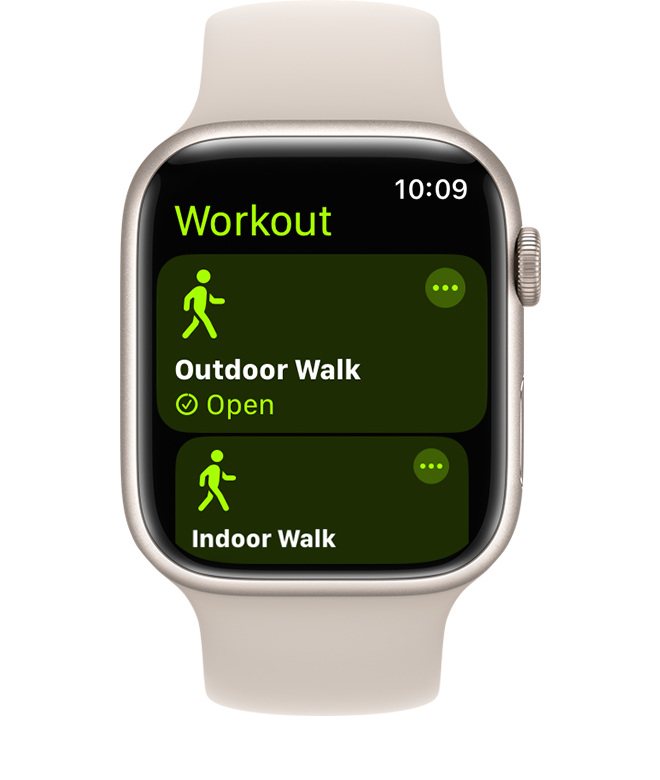
Wear the watch correctly. It should sit firmly against your skin without being painful. A loose band can cause gaps in heart-rate data and weaker motion readings.
Keep your Apple Watch updated and check that your personal information is accurate. Turn on workout detection only if you want it, and start the workout manually when you need a clear start time.
For better results:
• Calibrate the watch outdoors.
• Use the same wrist position each time.
• Avoid covering the sensor with clothing.
• Do not hold treadmill rails during normal training.
• Keep your arm swing natural.
• Clean the back sensor after sweaty workouts.
• Use a chest strap if heart-rate precision matters.
Apple Watch distance is best viewed as a personal estimate. It becomes more useful when you compare your own workouts over time. A stable pattern can guide training, even if the number is not exact to the last hundredth of a mile.
Which one should runners trust?
Trust the treadmill for indoor belt speed and distance when the machine is well maintained. Trust the Apple Watch for workout records, heart-rate trends, outdoor routes, and long-term activity history.
For structured treadmill training, follow the treadmill speed and incline. If your plan calls for a 10-minute mile, set the machine to about 6.0 miles per hour. Use the Apple Watch to monitor time and heart rate, not to argue with every small distance difference.
For outdoor running, the Apple Watch is usually the practical choice. It can record your route and estimate pace without a treadmill. GPS may still lose accuracy near tall buildings, under dense trees, or during sharp turns.
A balanced approach works well:
-
Use treadmill speed for indoor intervals.
-
Use Apple Watch heart rate to judge effort.
-
Compare both devices over several sessions.
-
Use a chest strap for advanced heart-rate work.
-
Focus on pace, effort, and progress together.
This answers what’s more accurate, the treadmill or Apple Watch, without forcing one device to do every job.
A practical test you can do at home
You can compare your devices with a simple repeatable test. Choose a treadmill that appears well maintained and run for 20 to 30 minutes at a steady pace. Do not hold the rails, and wear your Apple Watch as you normally do.
Record:
• Treadmill distance
• Apple Watch distance
• Treadmill speed
• Workout time
• Apple Watch heart rate
Repeat the test on two or three different days. Keep the speed, incline, and duration similar. If the watch always reports slightly less distance, that may reflect calibration or a different stride pattern. If the treadmill result changes widely, the machine may need service.
This kind of test is more useful than comparing one short workout. Short sessions magnify small start and stop differences. Longer, steady workouts give both systems more data to work with.
From a coaching standpoint, the biggest mistake is changing your plan every time two numbers disagree. Pick a main metric for each goal, then use the other device as supporting information.
When the treadmill may be wrong
A treadmill can display an inaccurate speed if its belt slips or its sensor loses calibration. The belt may also slow slightly under heavy load, especially on an older machine. You may not notice the difference because the console still shows the programmed speed.
Signs of a possible treadmill problem include:
• The belt feels uneven.
• The belt pauses or surges.
• The displayed pace feels very different from outdoor running.
• Two identical machines produce very different workout times.
• The belt makes unusual sounds.
• The machine has not received recent maintenance.
Do not attempt to repair a commercial treadmill without proper training. Report the issue to gym staff or follow the manufacturer’s service guidance. A machine that slips or surges can create a safety risk.
When the Apple Watch may be wrong
Apple Watch errors often come from movement that does not match normal walking or running. Holding rails is the classic example, but pushing a cart, carrying a child, or using an unusual arm position can also affect the estimate.
GPS errors are more common outdoors. Signals can bounce off buildings or weaken under trees. Indoor distance errors may happen because the watch has not learned your stride or because your stride changes with fatigue.
If your Apple Watch seems wrong:
• Check your fit.
• Confirm your Health profile.
• Calibrate it outdoors.
• Compare it with a known route.
• Restart the watch if workout data freezes.
• Check for software updates.
• Use a chest strap for demanding heart-rate sessions.
The goal is not to make every reading perfect. The goal is to make the data consistent enough to support safe and sensible training.
Frequently asked questions about what’s more accurate, the treadmill or Apple Watch
Is a treadmill more accurate than an Apple Watch for distance?
A calibrated treadmill is usually more accurate for indoor distance because it measures belt movement directly. The Apple Watch estimates distance from wrist motion and stride data, so rail use or unusual arm movement can affect the result.
Is Apple Watch accurate on a treadmill?
Apple Watch can be reasonably accurate on a treadmill after proper calibration. Its result may differ from the treadmill when your stride changes, you hold the rails, or the watch does not fit securely.
What’s more accurate, the treadmill or Apple Watch for pace?
For indoor running, the treadmill usually gives the better pace reference when it is maintained and calibrated. The Apple Watch can still show useful pace trends, but it may need time and outdoor workouts to learn your stride.
Does Apple Watch overestimate or underestimate treadmill distance?
It can do either. Many users see a lower distance when they hold the rails or limit arm movement, while unusual arm motion can cause an overestimate.
Is Apple Watch or treadmill better for calories?
Neither device gives a perfectly accurate calorie count. The Apple Watch may use more personal data and heart-rate information, while the treadmill uses speed, incline, time, and entered body weight.
Should I trust Apple Watch heart rate on a treadmill?
Apple Watch heart rate can be useful for steady workouts when the watch fits well. For fast intervals, medical concerns, or precise training zones, a chest-strap monitor is usually a better option.
Why does my treadmill say I ran farther than my Apple Watch?
The treadmill counts belt movement, while the Apple Watch estimates movement from your wrist and stride. Holding the rails, changing your arm swing, or using an uncalibrated watch can make the Apple Watch report less distance.
Conclusion
So, what’s more accurate, the treadmill or Apple Watch? For indoor speed and distance, a well-maintained treadmill usually wins. For heart-rate trends, outdoor routes, workout history, and personal training data, the Apple Watch is more useful.
Neither device should be treated as perfect, especially for calories. Improve your results by calibrating the treadmill, wearing the watch snugly, keeping your arm swing natural, and comparing trends across several workouts. Choose one main device for each goal, stay consistent, and use the data to guide progress rather than create stress. Try the comparison test in your next workout, then share your results or explore more evidence-based fitness guides.

Brandon Knoxley is a sport & fitness writer and training guide contributor at MySportFitHub. He focuses on practical workouts, performance-based training, and honest fitness gear insights designed for real people and real results. Brandon is passionate about helping beginners and active individuals train smarter, avoid common mistakes, and build sustainable fitness habits.