How To Turn On Precor Treadmill: Quick Start Guide
To turn on a Precor treadmill, plug it in, switch on the power, attach the safety clip, and press Quick Start.
Learning how to turn on a Precor treadmill is simple once you know where the power switch and safety key are located. Precor makes several treadmill models, so the buttons may look different, but the start-up process is usually much the same. This guide explains each step, common problems, safety checks, and the best way to shut the machine down after your workout.

How to Turn On a Precor Treadmill
Most Precor treadmills need four things before they will run: electrical power, a working power switch, a safety clip, and a start command. Follow these steps in order.
1. Check the treadmill area
Before turning on the treadmill, make sure it sits on a flat, stable floor. Remove water bottles, towels, bags, or other items from the belt and side rails.
Leave clear space around the machine. A clear area helps you step off safely if you lose balance or need to stop quickly.
2. Plug in the treadmill
Insert the power cord into a grounded wall outlet. Avoid using an extension cord unless the treadmill manual specifically allows it.
A loose plug can cause the console to stay dark or shut off during use. If the treadmill is in a gym, the power cord may already be connected behind or beneath the unit.
3. Find the power switch
Look near the front base of the treadmill. On many Precor models, the main power switch is close to the power cord.
Move the switch to the “I” or “On” position. The “O” symbol means “Off.” Some models may have a switch at the front of the treadmill, while others place it near the rear power connection.
4. Attach the safety clip
Find the red safety key or magnetic safety clip. Attach one end to the console and clip the other end to your clothing.
The treadmill may not start without this key. The key is designed to stop the belt if you move too far away from the console or fall.
5. Stand on the side rails
Place both feet on the side rails. Do not stand on the moving belt while starting the machine.
Starting from the side rails gives you more control. It also lets you step onto the belt only after it begins moving at a slow speed.
6. Press Quick Start
Press the Quick Start, Start, or Go button on the console. The treadmill should begin a short countdown before the belt moves.
Step onto the belt when it starts. Use the speed buttons to increase or reduce your pace. Begin slowly, especially if you have not used that treadmill before.
7. Set your workout
After the treadmill starts, you can choose a program, speed, incline, time, or workout goal. On some Precor consoles, you must choose a program before pressing Start.
Common workout choices include:
• Manual mode for full control of speed and incline
• Interval programs for repeated hard and easy periods
• Weight loss or calorie programs
• Heart-rate programs on compatible models
• Hill or rolling terrain programs

Where Is the Power Button on a Precor Treadmill?
The power button on a Precor treadmill is usually a rocker switch near the front base. It is often close to the power cord, but its exact location depends on the model.
Commercial Precor treadmills may have the switch low on the front frame. Some models place it on the side or near the rear of the base. Look for a small switch marked with “I” and “O.”
If you cannot find it, follow the power cord from the wall outlet to the treadmill. The switch is often close to the point where the cord enters the machine.
Do not confuse the console buttons with the main power switch. The console controls the workout, while the main switch supplies power to the treadmill.

How to Start a Precor Treadmill Without a Program
You can usually start a Precor treadmill in manual mode by pressing Quick Start. This option lets you control the speed and incline during the workout.
Use this simple process:
-
Turn the main power switch to “On.”
-
Attach the safety clip to your clothing.
-
Stand on the side rails.
-
Press Quick Start or Start.
-
Wait for the countdown.
-
Step onto the belt.
-
Adjust speed and incline with the control buttons.
Manual mode is useful when you want a basic walk or run. It also helps new users learn the console without choosing a complex workout.
On some Precor models, the console may ask for your weight, age, time, or workout goal. Enter the information if you want more accurate calorie or heart-rate estimates. These estimates are useful for tracking, but they are not medical measurements.

How to Turn On a Precor Treadmill at a Gym
A gym treadmill may be in standby mode rather than fully switched off. Touch the screen, press a button, or step onto the side rails to wake the console.
Once the display lights up, attach the safety clip and press Quick Start. Some gyms use a power-saving system that turns off the console when the treadmill has been idle for several minutes.
If the screen stays dark, check these points:
• Is the main power switch set to “I”?
• Is the power cord firmly connected?
• Is the emergency stop key in place?
• Is the wall outlet working?
• Does the treadmill display a service message?
Ask gym staff for help if the treadmill still does not respond. Do not remove the motor cover or try to repair electrical parts in a public gym.
How to Use the Safety Key Correctly
The safety key is one of the most important parts of starting a Precor treadmill. It creates a safety connection between you and the machine.
Attach the clip to a strong part of your shirt or waistband. Avoid loose fabric that could allow the clip to fall off too easily.
Before every workout, check that:
• The key is fully inserted into the console.
• The clip is firmly attached to your clothing.
• The cord is not twisted around your hand or feet.
• You can move freely without pulling the key from the console.
If the safety key comes out, the treadmill should stop quickly. The belt may not stop instantly, so always stay alert and keep your balance.
Never try to bypass the safety key. It is a protective feature, not an optional accessory.

Precor Treadmill Start-Up Problems and Fixes
Even when you follow the correct steps for how to turn on a Precor treadmill, the machine may not start. Most problems come from power, the safety key, or the console settings.
The console is completely dark
Check the wall outlet first. Plug in a lamp or another small device to see whether the outlet works.
Next, check the power cord and main switch. Make sure the switch is set to “I” and that the cord is fully inserted.
If the outlet works and the treadmill still has no display, stop using the machine. A damaged cord, blown fuse, or internal electrical fault may need professional service.
The display is on, but the belt does not move
Confirm that the safety key is attached. Many Precor treadmills will show a message or remain inactive when the key is missing.
Press Quick Start or Start after entering any required information. If the treadmill still does not move, look for an error code and report it to gym staff or a qualified technician.
The treadmill says “Safety Key” or “Insert Key”
Remove the key and insert it again. Make sure it sits firmly in the correct position.
If the message remains, the key may be damaged or the sensor may not detect it. Do not force the key into the slot.
The treadmill starts and then stops
A treadmill may stop when the safety key pulls out, when the belt detects a fault, or when the motor becomes overloaded. Step onto the side rails and switch the machine off.
Do not keep restarting the treadmill if it stops more than once. Repeated stops may point to a belt, motor, sensor, or electrical problem.
The belt feels slow or uneven
A belt that feels slow may need lubrication, cleaning, or adjustment. Dirt and friction under the belt can increase motor strain.
Never apply lubricant unless the care instructions for that model allow it. Using the wrong lubricant can damage the deck or affect belt movement.
Common Mistakes to Avoid When Starting a Precor Treadmill
Many treadmill problems begin with a small start-up mistake. Avoiding these errors makes your workout safer and smoother.
• Do not start while standing in the center of the moving belt.
• Do not hold the side rails during the entire workout unless you need support.
• Do not use a treadmill with a frayed cord or damaged safety clip.
• Do not force the speed to a high level before testing your balance.
• Do not press random buttons if the console displays an error.
• Do not place a towel, phone, or bottle near the front belt area.
• Do not use the treadmill if the belt slips, jerks, or makes a strong burning smell.
In my experience helping people use gym equipment, the most common mistake is stepping onto the belt before pressing Start. Standing on the side rails first feels slower, but it gives you a safe starting point and better control.
Another common mistake is assuming every Precor console works exactly the same way. The buttons may differ between models, so read the labels and follow the instructions on the display.

How to Adjust Speed and Incline Safely
After you learn how to turn on a Precor treadmill, use small changes to control your workout. Press the speed up or down buttons one time at a time until you understand how quickly the machine responds.
Hold the handrails only when you need help with balance. Regularly gripping the rails can reduce the natural movement of your arms and may change your walking form.
For incline training, begin with a low grade. Incline increases the effort placed on your legs and heart, even when the speed stays the same.
A safe progression may look like this:
-
Walk for two to five minutes at an easy pace.
-
Increase speed by a small amount.
-
Check your posture and breathing.
-
Add a small incline if you feel stable.
-
Return to a lower speed before ending the workout.
If you feel chest pain, severe shortness of breath, dizziness, or unusual weakness, stop the workout and seek appropriate medical help. People with health conditions should ask a qualified health professional about exercise intensity.
How to Stop and Turn Off a Precor Treadmill
Ending the workout correctly matters as much as learning how to turn on a Precor treadmill. A sudden stop can make you lose balance.
Follow these steps:
-
Press Stop once to pause or end the workout.
-
Reduce the speed if the treadmill does not stop at once.
-
Wait until the belt comes to a complete stop.
-
Step onto the side rails.
-
Remove the safety clip from your clothing.
-
Turn the main power switch to “O” if the treadmill will not be used soon.
Some gyms prefer that users leave the main switch on so staff can manage the equipment. Follow the rules posted near the machine.
If you use the treadmill at home, switch it off after use when the manual recommends doing so. Keep the power cord away from walkways and check the belt area before the next workout.
Precor Treadmill Care Tips
Good care helps a Precor treadmill start more reliably. Wipe sweat from the console and handrails after each workout.
Keep the belt and deck free from dust. Dust can collect near the motor and may increase wear over time. Use only cleaning products approved for fitness equipment.
Check the following from time to time:
• Power cord condition
• Safety key and clip
• Belt alignment
• Belt tension
• Unusual sounds
• Error messages
• Loose parts
A treadmill belt that moves to one side may need adjustment. Belt adjustment requires care because over-tightening can damage the belt, deck, or motor. If you are unsure, ask a trained technician.
Manufacturer maintenance guidance is the best source for lubrication intervals and belt adjustments because Precor models use different designs.
How to Turn On Different Precor Treadmill Consoles
Precor treadmills use several console types, including older LED displays and newer touch-screen systems. The layout may change, but the basic process remains consistent.
Older LED consoles
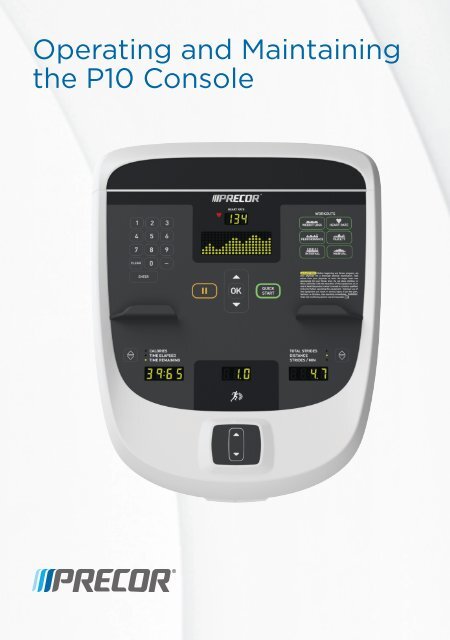
Older consoles often use physical buttons marked Quick Start, Stop, Speed, and Incline. Insert the safety key, press Quick Start, and follow the display prompts.
Touch-screen consoles
Touch-screen models may show a welcome screen. Tap the screen, select a workout, attach the safety key, and press Start.
Some touch screens require you to confirm user information before the belt begins moving. Read each prompt instead of pressing buttons at random.
Gym-linked consoles
Some treadmills connect to a gym network or entertainment system. The television or media screen may take longer to start than the treadmill controls.
If the media screen is off but the workout console works, the treadmill may still operate normally. Ask staff if the equipment uses a separate media power system.
Frequently Asked Questions About How to Turn On a Precor Treadmill
How do you turn on a Precor treadmill?
Plug the treadmill into a grounded outlet, set the main power switch to “I,” and insert the safety key. Stand on the side rails, then press Quick Start or Start.
Why will my Precor treadmill not turn on?
Check the wall outlet, power cord, main power switch, and safety key. If the console remains dark after these checks, stop using the treadmill and contact gym staff or a qualified service technician.
Can I start a Precor treadmill without the safety key?
Usually, no. Most Precor treadmills require the safety key to be inserted before the belt will move, and bypassing this feature is unsafe.
Where is the safety key on a Precor treadmill?
The safety key is usually attached to a cord with a clip and fits into a slot on the console. The clip should attach to your clothing before you start walking or running.
How do I start a Precor treadmill in manual mode?
Turn on the main switch, insert the safety key, stand on the side rails, and press Quick Start. Adjust speed and incline manually after the belt begins moving.
How do I stop a Precor treadmill safely?
Press Stop and wait until the belt fully stops. Step onto the side rails before removing the safety clip or turning off the main power switch.
Why does my Precor treadmill show “Insert Safety Key”?
The console is not detecting the safety key. Remove it, insert it again, and make sure it is seated correctly; if the message continues, the key or sensor may need service.
Conclusion
Learning how to turn on a Precor treadmill takes only a few steps: connect the power, switch on the machine, attach the safety key, stand on the side rails, and press Quick Start. Start slowly, use small speed changes, and stop the treadmill before stepping off the belt.
The safest routine is simple and repeatable. Check the machine before each workout, listen for unusual sounds, and ask for help when an error remains. Save this guide for your next workout, and share your own Precor treadmill tips in the comments.

Brandon Knoxley is a sport & fitness writer and training guide contributor at MySportFitHub. He focuses on practical workouts, performance-based training, and honest fitness gear insights designed for real people and real results. Brandon is passionate about helping beginners and active individuals train smarter, avoid common mistakes, and build sustainable fitness habits.