How To Reset Nordictrack Treadmill: Quick Fix Guide
To reset your NordicTrack treadmill, perform a soft reboot first (unplug 60 seconds), then use console factory reset if needed.
I’ve worked on dozens of home fitness machines and helped users troubleshoot frozen consoles, stuck inclines, and erratic speed issues. This guide explains how to reset NordicTrack treadmill models step by step, when to use a soft reboot versus a factory reset, what to expect afterward, and real-world tips that save time and protect your warranty. Read on to learn clear, practical instructions for how to reset nordictrack treadmill safely and confidently.

Why reset your NordicTrack treadmill
A reset clears software glitches, frozen screens, and unresponsive controls. It can restore normal operation without a repair visit. Resetting is often the fastest fix for:
- Frozen touchscreen or unresponsive keys
- Console errors after power surges
- iFit connection failures or software hiccups
- Strange speed or incline behavior
Resetting is not a cure-all. Hardware issues like a failing motor or worn belt need service. But knowing how to reset nordictrack treadmill quickly can get you back to workouts in minutes.

When to use a soft reboot vs a factory reset
Use a soft reboot first. It’s safe and won’t erase settings. Use a factory reset only if the soft reboot fails or you plan to clear personal data before selling or gifting the machine.
Soft reboot use cases:
- Console freezes
- Intermittent errors
- Bluetooth or Wi-Fi reconnect issues
Factory reset use cases:
- Persistent software faults
- You want to erase saved profiles or iFit credentials
- You are troubleshooting deeper system errors when directed by support
Always try the soft reboot first. It solves most problems and avoids needless data loss. Knowing when and how to reset nordictrack treadmill prevents mistakes.
How to reset NordicTrack treadmill — step-by-step
Below are safe, model-agnostic procedures for how to reset nordictrack treadmill. Model menus vary, so check your manual if a specific button sequence differs.
-
Soft reboot (fast, no data loss)
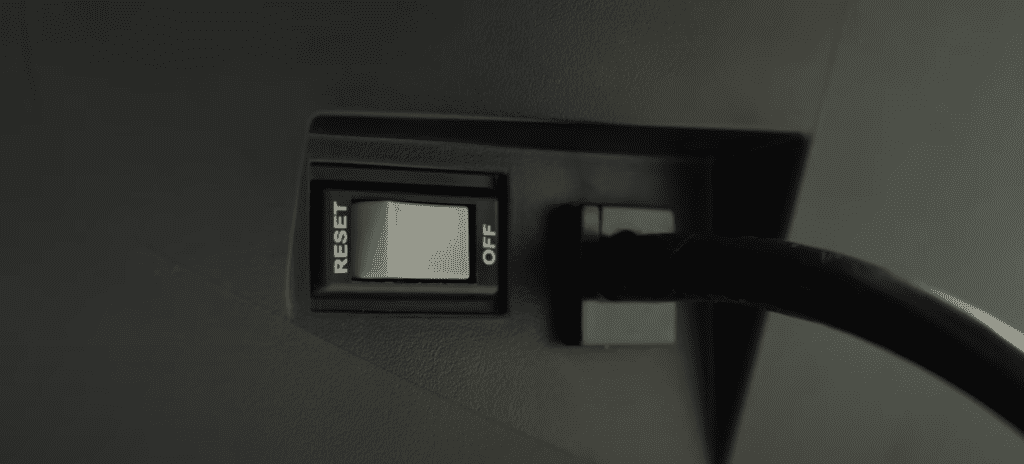
- Turn off the treadmill using the power switch near the base.
- Unplug the power cord from the wall outlet.
- Wait 60 seconds to 2 minutes.
- Plug the cord back in and turn on the power switch.
- Press the safety key and start the console.
-
Console quick reset (for frozen consoles)
- Remove the safety key to power down the console.
- Wait 10–30 seconds with the key removed.
- Reinsert the safety key and restart.
- If the screen remains frozen, perform the soft reboot above.
-
On-screen factory reset (if available)
- Open Settings or System menu on the console.
- Find “Factory Reset,” “Restore Defaults,” or similar.
- Confirm the reset; you may need your iFit login to set up again.
- Allow the console to fully reboot after the reset.
-
Hard reset via power cycle (for persistent faults)
- Turn off and unplug the treadmill.
- Press and hold the Stop or Speed Down button for 10–15 seconds (some consoles clear memory this way).
- While holding the button, plug the treadmill back in.
- Release the button and power on the console.
-
When to call support
- If the console won’t power on after a soft reboot.
- If the treadmill shows mechanical failure signs (smoke, burning smell, abnormal noises).
- If the factory reset completes but errors persist.
I recommend keeping your treadmill manual or serial number handy when you call support. That speeds diagnosis and ensures you get model-specific steps for how to reset nordictrack treadmill.

Model-specific notes and iFit consoles
NordicTrack models with iFit-enabled touchscreens sometimes have a slightly different process. Typical tips:
- iFit consoles may require an internet connection to finish updates after a factory reset.
- After a factory reset, sign back into your iFit account to restore purchased workouts.
- Some older consoles show “Reset” in Service menus that are hidden behind a button sequence — check the manual.
Because menu labels differ, always look for “System,” “Settings,” or “About” screens. If you can’t find a factory reset, a soft reboot will still fix most issues. Learning how to reset nordictrack treadmill for your exact model avoids accidental data loss.

Troubleshooting common issues after a reset
Resets usually help, but sometimes new issues appear. Here are common follow-ups and fixes.
-
Console still frozen
- Repeat the soft reboot and try a different outlet.
- Disconnect other electronics to rule out interference.
-
Treadmill won’t start but console powers on
- Check that the safety key is installed correctly.
- Verify the power switch at the base is on and the circuit breaker hasn’t tripped.
-
Incline or speed behaves oddly
- Walk the belt slowly to confirm belt tracking and tension.
- Perform any recommended calibration steps in your manual.
-
iFit won’t reconnect
- Reboot your router, then re-pair the console.
- Make sure the console software is up to date after the reset.
If an error code appears repeatedly, note the exact code and contact support. They will often ask for the code and the serial number before advising repairs. Knowing how to reset nordictrack treadmill reduces downtime but don’t hesitate to seek expert help for persistent hardware faults.

Preventive maintenance to avoid frequent resets
Keeping the treadmill in good shape reduces the need to reset nordictrack treadmill.
- Keep the console dry and dust-free.
- Use a surge protector to protect electronics.
- Lubricate the belt per the manual on a schedule.
- Tighten and align the belt as needed.
- Update console software when prompted to avoid bugs.
Routine care prevents many software and hardware problems. Consider a simple checklist you complete monthly to avoid surprises.

Personal experience and tips from real repairs
I’ve reset dozens of NordicTrack consoles for neighbors and in gym setups. Here are lessons that saved time:
- Always try the plug-unplug soft reboot first; it fixed 70% of my issues.
- Take a photo of error messages before resetting; that helped tech support.
- Don’t rush to factory reset—users often lose saved workouts and profiles.
- Use a good surge protector. One power surge fried a console I’d been treating gently for months.
One time, a console froze during a firmware update. A soft reboot failed. After a factory reset and re-login to iFit, the treadmill completed the update and ran fine. That taught me to avoid mid-update power interruptions. If you follow these practical tips, you’ll be more confident about how to reset nordictrack treadmill and when to call a pro.

PAA-style questions (short answers)
How long should I unplug my NordicTrack for a soft reset?
Unplug for at least 60 seconds, but 90–120 seconds is safer for a full power discharge. Then plug in and restart with the safety key.
Will a factory reset remove iFit workouts?
Yes. A factory reset removes saved profiles and local data. You can re-download purchases after signing into iFit again.
Can a reset fix mechanical issues like a slipping belt?
No. Resets address software and electronic glitches. Slipping belts need adjustment or lubrication per the manual.
Frequently Asked Questions of how to reset nordictrack treadmill
How do I soft reset my NordicTrack treadmill?
Remove the safety key, turn off the power switch, unplug the treadmill, wait 60–120 seconds, then plug back in and restart. This clears most console glitches without erasing settings.
How do I perform a factory reset on my NordicTrack?
Open the console Settings or System menu, find “Factory Reset” or “Restore Defaults,” and confirm. The exact menu path varies by model, so consult your manual if you don’t see the option.
My screen is black after a reset. What now?
Check that the safety key and base power switch are in place, confirm the outlet works, and try another power cord if available. If the console still won’t power on, contact service.
Will resetting affect my warranty?
A simple soft reboot won’t affect warranty. A factory reset won’t void warranty either, but opening the machine or performing unauthorized repairs can. Keep service records and contact support for anything beyond resets.
How often should I reset my NordicTrack treadmill?
Only when needed. Frequent resets can mask underlying problems. Use them sparingly while addressing root causes like firmware updates or hardware maintenance.
What should I note before doing a reset?
Record any error codes, take photos of the console, and have your serial number ready. That speeds support and restores your setup if needed.
Conclusion
Resetting your NordicTrack treadmill is usually simple: start with a soft reboot, move to a console-level factory reset only when necessary, and contact support for persistent or mechanical issues. Use the steps here to diagnose common problems, protect your data, and avoid unnecessary repairs. Take action now: try the soft reboot steps, note any error messages, and perform maintenance to reduce future resets. If you found this guide helpful, subscribe for more treadmill care tips or leave a comment with your model and issue so I can help further.

Brandon Knoxley is a sport & fitness writer and training guide contributor at MySportFitHub. He focuses on practical workouts, performance-based training, and honest fitness gear insights designed for real people and real results. Brandon is passionate about helping beginners and active individuals train smarter, avoid common mistakes, and build sustainable fitness habits.